


I recently read The Adventures of an IT Leader by Robert D. Austin, Richard L. Nolan, and Shannon O'Donnell — a business novel published by Harvard Business Press that follows a newly appointed CIO as he navigates his first year in the role. No IT background, a sprawling vendor landscape, and a board that expects miracles.
The book’s central lesson stayed with me: technology doesn’t manage itself. Someone has to own the architecture, costs, vendors, risk, and strategy. If no one does, the organization pays for it — in redundancy, in outages, in ballooning spend, in chaos.
It got me thinking. What if I applied the same lens to my home?
🏠 You already have an IT estate. You just haven’t named it.
Most households today run on a sprawling layer of technology — devices, subscriptions, services, networks, and security tools — that rivals the complexity of a small business. The difference is that a small business has someone accountable for it. Your home probably doesn’t.
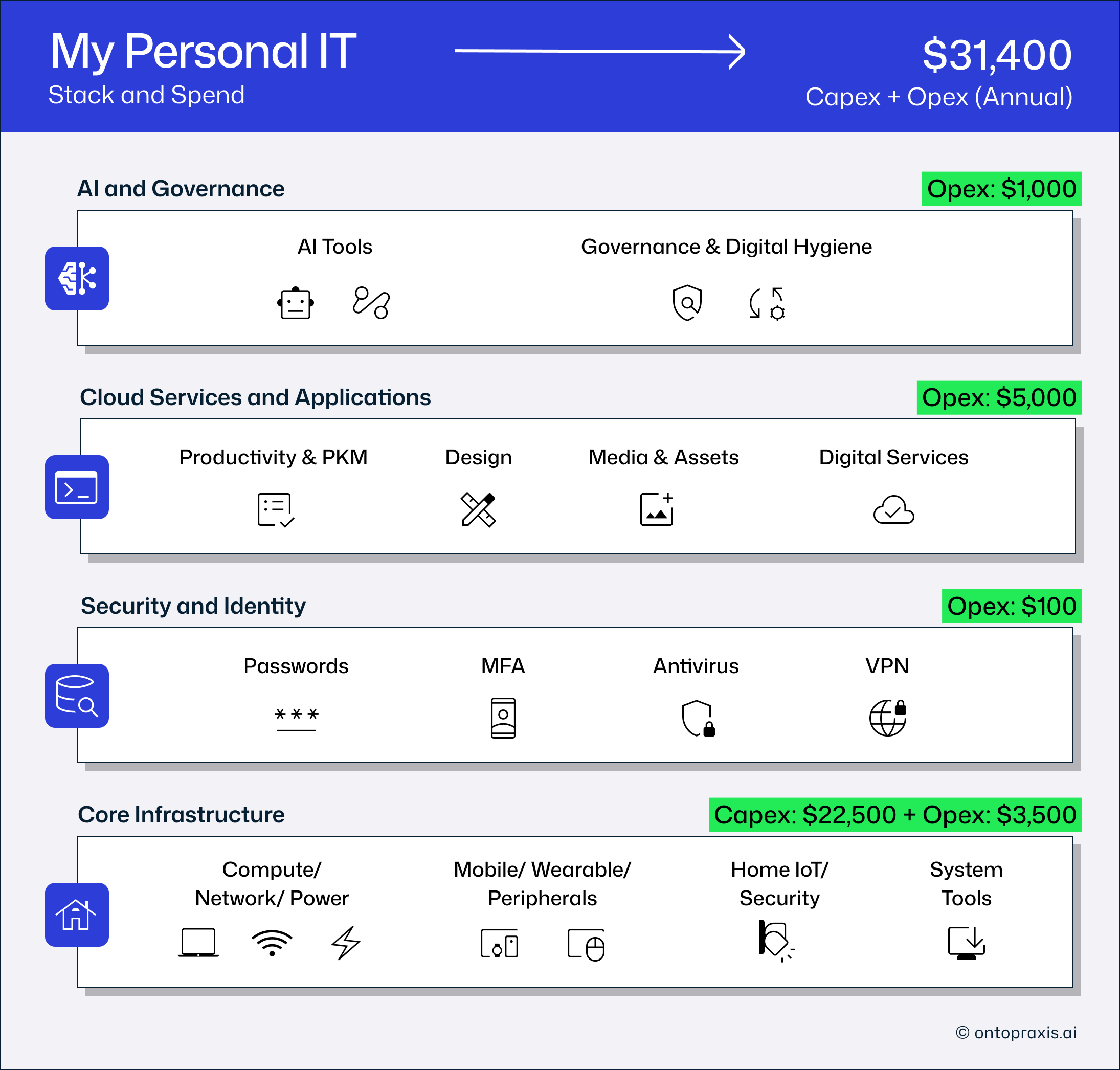
When I started tracking what I owned and what I was paying for it, the number surprised me. Across compute, mobile, peripherals, cloud services, AI tools, networking, and security — my household runs a ~$32,000 technology estate. Here’s how it breaks down:
🔌 Core Infrastructure — $26,000 (81%): The hardware layer. MacBooks, iPhones, iPads, monitors, mesh network, mobile plans, and home security cameras. The one that sneaks up on you — purchases are spread over years and rarely reviewed together.
☁️ Cloud Services & Apps — $5,000 (16%): The subscription layer. Microsoft 365, Google Workspace, Notion, LinkedIn, Figma, Grammarly, Spotify, YouTube, and 20+ more. Each is individually defensible. Collectively, they compound every year.
🤖 AI & Governance — $1,000 (2.6%): ChatGPT Plus, Grok, AppleCare — plus zero-cost but high-effort governance routines: OS updates, backups, parental controls, subscription audits. The policy layer most households skip entirely.
🛡️ Security & Identity — $100 (0.4%): Bitdefender, VPN, Password Manager, Authenticator. Remarkably inexpensive for what it protects — but only effective if the governance layer above it actually runs.
📖 The CIO move: inventory before judgment
When Jim Barton takes over as CIO, his first instinct is to look competent — to pretend he understands the landscape. His mentor pushes back. The most important thing a new CIO can do, she tells him, is get an honest picture of what exists before making any decisions.
That’s the first move for the domestic CIO, too: inventory before judgment.
Once you have the picture, the book’s framework maps cleanly onto a household:
📋 Governance — who is accountable for technology decisions in your home? Who reviews the subscriptions? Who handles OS updates before a vulnerability becomes a breach? If the answer is “nobody really” — you have a governance gap.
💰 Cost management — do you know your total annual technology spend? Not your biggest bill — your total. Most people don’t. When I added it up, the number was clear. It forced me to ask which services truly earned their place and which had survived only by being forgettable.
⚡ Risk — what happens when the primary device fails? When the mesh router goes down during a school day? Enterprise IT builds redundancy into critical systems. Your home probably doesn’t. But you can build the mindset.
🤝 Vendor relationships — annual plans auto-renew. Family plans are routinely underused. Free tiers get you in the door — but once your photos, files, and habits are embedded in a platform, leaving becomes expensive, whether you pay to stay or pay the time cost of moving out. Understanding how vendors actually work is vendor literacy — and it pays.
🔍 The governance layer nobody builds at home
This is the only layer in my stack with no line-item cost. It's also the one that makes everything else work.
Password updates. OS and app updates. Backups. Parental controls. Subscription audits. These cost nothing in money — and they are the reason the $100 I spend on security tools actually works. Strip the governance layer, and the security layer stops mattering.
In enterprise IT, this is called the operating model. It’s not the software you buy — it’s the practices you maintain. Jim Barton’s biggest early mistake in the book is focusing on tools while underinvesting in process. Most households make the same error.
A domestic operating model doesn’t need to be elaborate:
✅ Monthly — cancel any subscription unused in the last 90 days
✅ Quarterly — rotate passwords on critical accounts
✅ Annually — assess hardware age; anything 5+ years approaching end-of-life?
✅ Weekly — verify your backups actually restore
Thirty minutes a month. The discipline is the product.
📊 Start with the audit. Here’s a tracker to help.
Forget the tools for now. Start with the inventory.
I’ve structured the tracker I use around the same four layers — so you can map your own stack the way I mapped mine. It’s free, it’s a Google Sheet, and you make a copy to use as your own.
→ Get the Home IT Tracker — free template
List every device. List every subscription. Categorize it. Calculate the annual total. Look at the number — it will tell you something useful.
🎯 This is not about cutting costs
The goal isn’t to spend less. The goal is to spend deliberately.
A household that spends $32,000 on technology and gets full value from that investment — productivity, security, connectivity, creative capability, AI leverage — is making a sound decision. A household that spends $12,000 with no visibility into what’s running, what’s expiring, or what’s vulnerable is not.
In 2026, understanding your domestic technology stack isn’t a hobby for the technically minded. It’s a household imperative — for your costs, your risks, and your family’s safety. The only question is whether you get ahead of it deliberately or get surprised by it later.
About this piece: Written from personal experience managing a domestic IT estate across four layers — infrastructure, cloud services, security, and AI. The referenced tracker uses the same taxonomy as here and is available as a free Google Sheets template.
Sources
Austin, Nolan & O’Donnell — Adventures of an IT Leader, Harvard Business Review Press
Home IT Tracker Template — Google Sheets